


You want to order a bouquet. You found a suitable one, looked at the composition, and pressed the button. The site asks you to create an account.
Email. Password. Password again. Now you have to open the email and confirm the address.
And you still do not know whether the bouquet will be delivered at the time you need.
Imagine this moment on your own site. The person has already chosen a product or a service. What do they have to do next?
What you get from registration, and what the client gets
It is convenient for the owner when every buyer has a profile. Requests are visible in one place. Addresses and order history can be saved.
For a person who has come for the first time, that benefit may not be obvious yet. They need a bouquet for the evening. Purchase history will appear later, if they come back.
I would check what cannot be done right now without an account. If the answer comes down to “that is how our site is built,” there is reason to look more carefully at how the order is placed.
If a site asks a person to create an account, I want to understand which task of the client this solves at this particular step.
Take a fictional flower studio. Here the florist confirms the composition of the bouquet and whether delivery is possible. So the first message is not yet an accepted order.
In one version, registration is required before the request. In the other, it is enough to say when the bouquet is needed and how to contact the buyer. The chosen bouquet is already attached to the request. The florist will clarify the rest in the conversation.
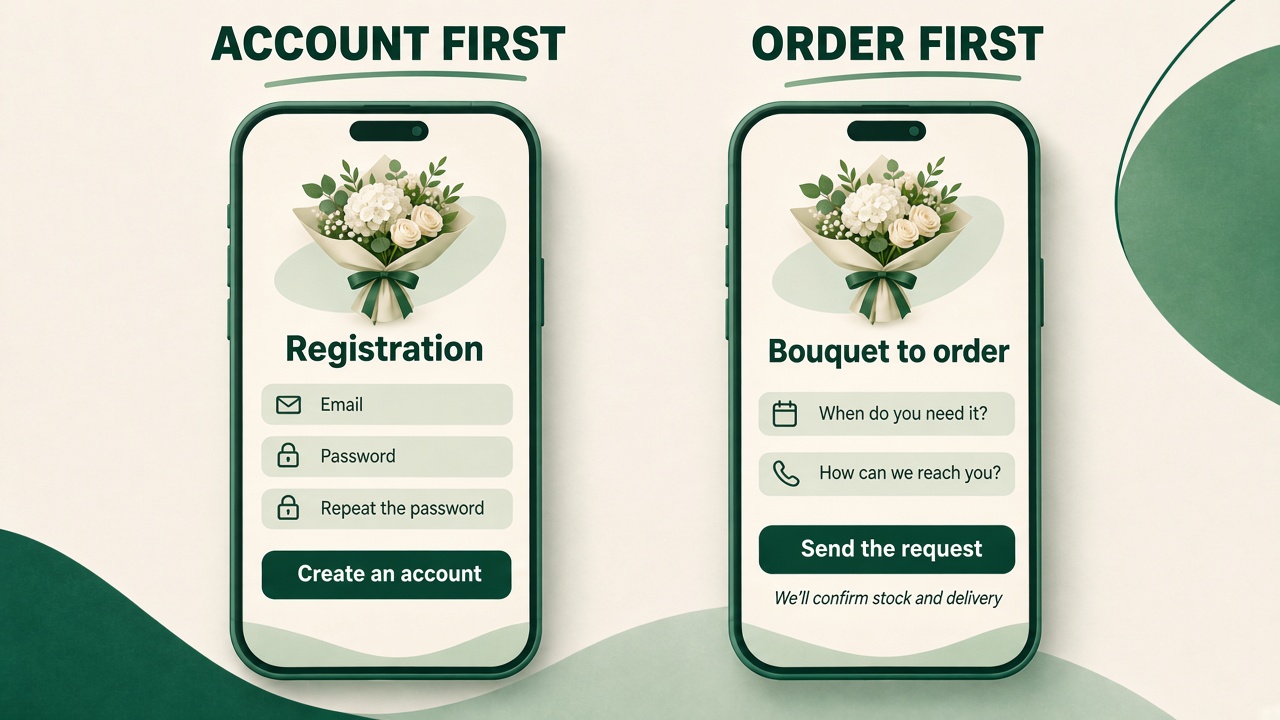
A short form fits here because the next step is taken by an employee. If the site itself calculates delivery and takes payment, it will need other details. The address cannot simply be removed when the order cannot be carried out without it.
So I would not start with a contest of “who has fewer fields.” First you need to decide what will happen after the form is sent, and which data is actually missing for that.
When an account is actually useful
Imagine a buyer who regularly orders supplies for a studio. It is convenient for them to repeat a previous order, see the agreed prices, and download documents. In that case, signing in to an account has a clear purpose.
Or a client is working with you on a project: they upload materials, receive files, and approve stages. Access to that data cannot be opened to any visitor.
But even on a site like that, the first contact can start with an ordinary request. An account does not have to be required before the person has found out whether you suit each other.
What can be offered after the order
Back to the bouquet. The terms are agreed, the order is accepted. Now an offer to save the address for the next delivery is tied to an action the person has just taken.
If the site supports that path, you can offer to create an account after the order is placed. Explain the specific benefit and leave the option to decline. The necessary notifications about the current order should still arrive through the channel you agreed on.
Do not quietly create an account for the person and subscribe them to every mailing for the sake of a nicer registration count. They should understand what they are registering for.
Try ordering from yourself as a new client
Open the site on a phone where you are not signed in. Choose a product or a service and go through to the request. It is better to give this task to a person who does not know how the site is built: steps that are familiar to you may no longer get in the way.
Here is what I would pause on:
- Is there a noticeable path without registration, if the business allows an order to be placed that way?
- Is the chosen product kept when the person leaves to confirm an email or recover a password?
- What happens if the code does not arrive, or the address is already linked to an account?
- After sending, is it clear whether the order was accepted or only a request to get in touch was received?
- Does the request reach the employee together with what the client chose?
If analytics is connected, look at how many people start placing an order and how many reach the next step. A stop at registration suggests where to look for the cause, but it does not prove the cause by itself. The person may have changed their mind because of the delivery price, or run into an error.
After the changes, check the whole path again. A form that is quick to fill in will not help much if the request gets lost, or the employee does not see the chosen product.
You may already have this arranged conveniently: an order is available without an account, the account is for regular clients, and phone confirmation takes one clear step. Then a redo for the sake of a redo is not needed.
If you are unsure, press “Message me on Telegram” and send a link to the site. Add a couple of words: what people order from you, and why registration is needed now. You can start with the question: “Is there something to improve here, or is it already fine?” That will make it easier to discuss whether a revision is needed, and how I can be of use.