



“Please order some more wrapping film.”
The message goes to the general chat. Then a photo of a finished order, a question about delivery, and tomorrow’s schedule arrive there too. A day later it turns out that nobody ordered the film. One person thought the other was handling it.
Here I would look at the path of the request itself. Where is it stored? Who is supposed to accept it? How does the employee find out that the materials can already be picked up?
I would give an internal bot the job of collecting the request and showing what is happening to it. The decision to purchase, and the responsibility for it, stay with people.
Turn the message into a request
Imagine a small studio. Employees periodically need consumable materials, and purchasing is handled by an assigned colleague.
In the teaching scenario, the bot asks several questions and saves the answers in a card. The request no longer depends on whether someone noticed one line among the other messages.
A process like this has to be set up on purpose. A bot that has simply been created knows neither your employees nor the purchasing procedure.
The employee presses “Materials needed.”
Bot: What is required? Give the name or the item code. You can attach a photo of the packaging.
Employee: Wrapping film, the same as in the photo.
Bot: How many do you need, and by when?
Employee: Two rolls, by Thursday.
Bot: For which area or order?
Employee: Packing finished items.
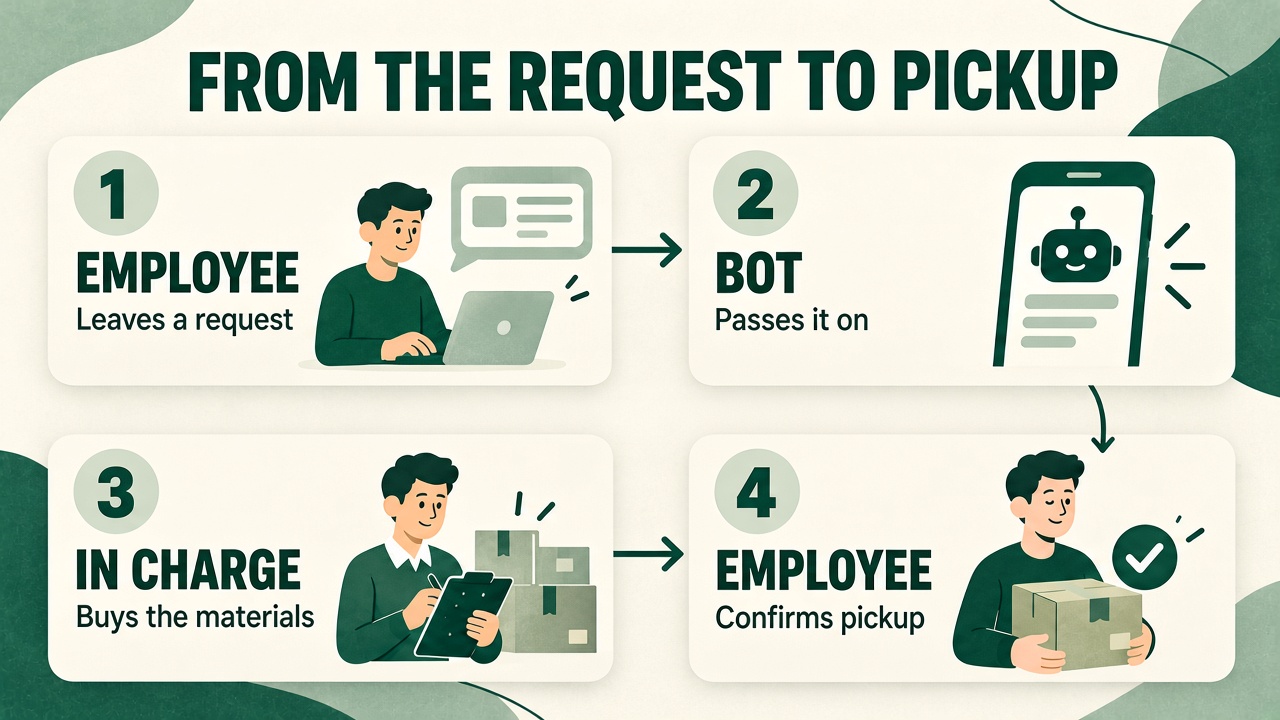
The bot shows a summary. The employee checks it and presses “Send.”
Bot: Request saved. A notification has been sent to the person responsible for purchasing. Status: waiting for review.
The person responsible now sees the name, the quantity, the date needed, and who submitted the request. They can take it into work, ask for a clarification, or explain a refusal.
When the materials arrive, that needs to be marked as well. In our example the employee confirms receipt, and only after that is the request closed. In another company a storekeeper may confirm the handover. It is important to agree in advance who takes the last step.
Agree on the rules first
- Who accepts requests, and who covers for them when they are away.
- Which details are needed for the decision, and which can be clarified later.
- When a manager’s approval is required.
- Which statuses the author sees: waiting for review, in progress, clarification needed, done, or declined.
- Who receives a reminder, and when, if a request sits without movement.
A reminder is useful when it has an addressee and a clear reason. For example, the person responsible receives a message about a request they have not reviewed by the agreed time.
It is not worth sending every change to all employees. Otherwise the bot quickly turns into another noisy chat. The author needs details about their request. The person doing the work needs details about the work they are responsible for.
Where the requests will be stored
The bot can be a convenient entry point from a phone. The requests themselves should be saved in an agreed system: for example, in a log that the responsible people can access, or in a record-keeping system already in use.
I would first check the tools that already exist. If the company already has convenient requests and notifications, setting those up may be enough. A new bot makes sense when it simplifies a specific step, not when it forces you to keep a second list by hand.
Employees should also be shown only the data available to them. Access to the internal bot should be given to verified users, and revoked when an employee leaves. One forwarded link is not enough for that.
Test it on one repeating task
- Create a test request and check that it was saved, and that the notification reached the person responsible.
- Ask for a clarification. Make sure the author received the question and the answer ended up in the same card.
- Check a refusal and a cancellation. The reason and the current status should be clear.
- Press send again. Check that an accidental repeat does not create an extra purchase.
- Go through to receipt of the materials. See who confirmed completion, and whether the author can see the result.
It is also worth checking what happens if sending the notification fails. A saved request should not disappear, and the person responsible should have a way to see the list of requests that have not been processed.
To start, you can choose one type of request and a small group of employees. After a trial, it will be clearer which fields are missing, which notifications get in the way, and whether submitting a request through the bot is convenient at all.
An internal bot can also be useful for reporting a breakdown of equipment, for requesting documents, and for passing a task between employees. But I would start with one clear problem that currently has to be solved by forwarding messages and reminding people by hand.
If you have a process like that, press “Message me on Telegram” on the site. Tell me who submits the request, who carries it out, and where the details get lost now. A discussion of automation can start from that.