


On Monday a new product needs to be shown. On Wednesday, a promotion announced. On Friday, the price list updated.
There is a logo, but every time it starts the same way: which background to choose, where to put the photograph, which typeface to write the price in? In the end, materials from one company look as if they were made for different shops.
In a situation like that I would look at which tasks repeat. The business may need a small set of ready templates for everyday work.
For me, a good template passes a simple check: the employee changes the photograph and the text, and the layout stays tidy.
A logo does not decide where to put the heading
A logo helps identify the company. It does not set the position of the price, the size of the photograph, or the space between lines.
Those decisions can be gathered into a template in advance. It already has a place for the image, the heading, and the terms. The person only has to update the content and check the result.
One universal picture for every case is usually awkward to use. A large price list and a short announcement need the information organized differently.
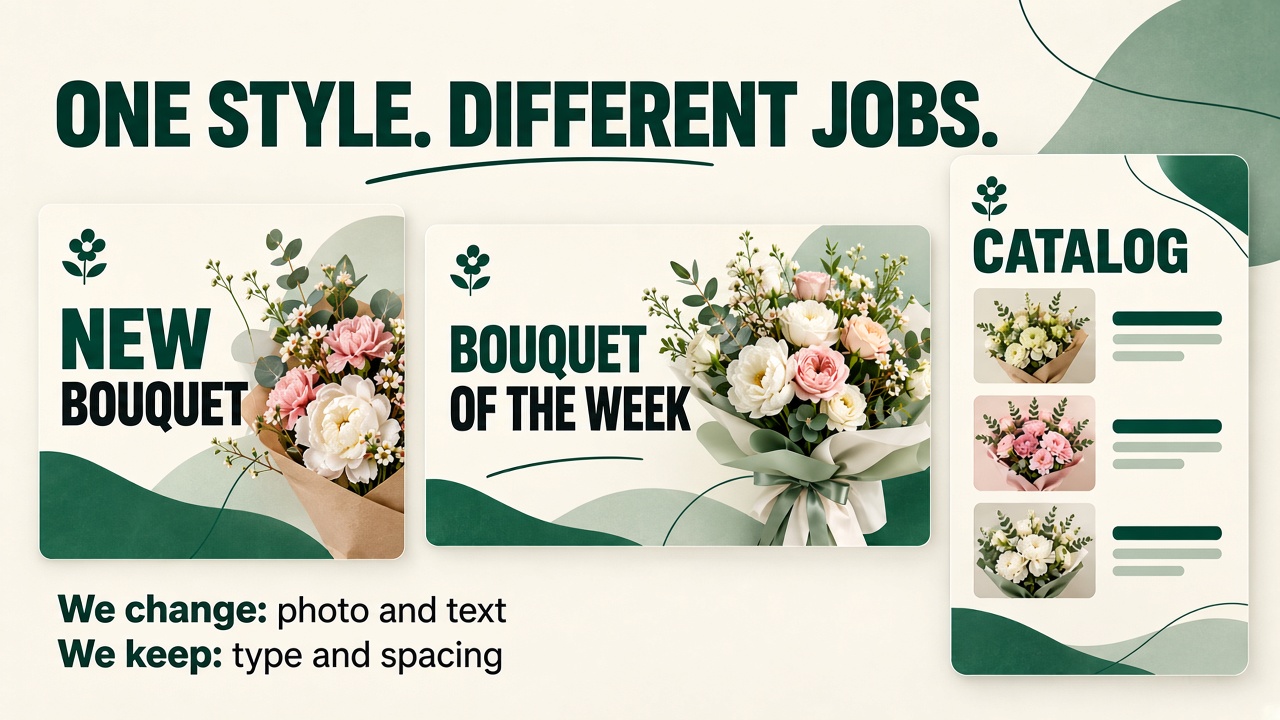
Imagine a fictional flower studio. It regularly shows new bouquets, highlights the offer of the week, and updates the catalog. For the example, let us put together three pieces with shared typefaces, colors, and spacing.
These are teaching layouts, not a real client project.
Start with what has to be done all the time
- A new product or service. A photograph, a name, a short explanation, and a price if needed.
- A promotion. The main offer, how long it runs, and the important terms.
- A price list or a catalog. Clear items, the cost, and the necessary notes.
- A useful post. A heading, and a place for a short piece of advice or an illustration.
You do not need to order this whole list. If you do not run promotions, the matching template may sit unused for months. And if every week you send clients a selection of products, that is the one that deserves attention.
I would gather recent materials and mark the repeating tasks. The contents of the set are easier to decide from those than from an abstract wish to “make everything look nice.”
What to change, and what is better kept
In the flower studio, the employee replaces the photograph of the bouquet, the name, and the description. In the offer of the week, they update the terms and the date. In the catalog, they change the items and the prices.
The typefaces, the position of the mark, the base colors, and the spacing stay as agreed. Each piece gets new content, but keeps a familiar look.
If the editor allows it, permanent elements can be locked against an accidental shift. And the original template should be kept separate: make a copy for a new post.
Ask to see the template in use
- Put in a short name and a long one. Check that the lines do not cover the photograph or the neighboring elements.
- Replace the shot with a horizontal one and a vertical one. See what gets cropped, and whether the position of the image can be changed.
- Add the real terms of a promotion. They should stay readable even if they run to more than one line.
- Export the finished file and open it on a phone. Judge the text at ordinary size, without zooming in.
- Let an employee assemble the next piece without hints. Write down where an explanation was needed.
A printed price list also needs the requirements of the print shop you chose. And for different digital formats, it is better to prepare suitable versions of the composition. Simply stretching a square post into a wide banner rarely keeps the elements in place.
Together with the working files, it is useful to receive a short note: where to change the text and the photo, how to make a copy, where to save the result. Do not forget to check that the employee has the typefaces and images they need.
When a template is no longer enough
A new service format, a complicated promotion, or a large presentation may need a separate solution. Do not squeeze every piece into an old template only for the sake of a matching look.
Templates are convenient for repeating tasks. And when the tasks themselves change, the set can be added to. For a small company this can perfectly well be gradual work, not one huge kit for every future case.
I would start with a few pieces you have to assemble most often. On those, both the design and the convenience of working on your own can be checked.
If you want to prepare a set like that for your business, press “Message me on Telegram” on the site. Send examples of the current materials and say who will update them.